To do video marketing using Claude, use it for the thinking work: strategy, scripts, storyboards, shot lists and captions. Claude cannot render video itself, so pass its plan to a video tool or a production team. Start with one 60-second explainer, publish it where buyers decide, measure watch time and demo requests, then scale.
What does video marketing using Claude mean?
Video marketing using Claude means using Anthropic’s AI assistant to handle the planning, writing and structuring of a marketing video, while a separate tool or team produces the footage and animation. Claude is a language model, so its strength is text, reasoning and code. In a video workflow, that covers the audience research, the message, the script, the scene plan and the copy that surrounds the finished video.
The approach suits SaaS, AI and tech companies for a practical reason. Software products are hard to explain in a sentence, and the people who understand them best, the founders and product managers, rarely have time to storyboard a video. Claude can take a messy product brief, a feature list, a support thread and a sales call transcript, and turn them into a structured video plan in minutes. That plan is a draft for a human to judge, not a finished asset.
It helps to think of the work in two layers. The thinking layer decides who the video is for, what one idea it must land and what the viewer should do next. The production layer turns that thinking into pictures, motion, voice and sound. Claude is strong in the first layer and indirect in the second, and most of the mistakes teams make come from asking it to do the second layer alone.
This guide walks through both layers in the order you would work: strategy first, then script, storyboard, production, distribution and measurement. It also marks the point where a professional team becomes the faster and safer choice, because that point arrives earlier than most marketers expect.
At Burnwe, we incorporate AI into our workflow as a technical tool, using it to speed up repetitive production tasks, data structuring, and rough prep, while keeping every creative decision human-led. Strategy, storytelling, visual direction, and final motion design stay in the hands of real directors and artists, ensuring your product and brand voice never feel automated.
Video marketing is the strategic use of video content to attract, educate, and convert your target audience across the buyer’s journey, covering everything from audience positioning and distribution to tracking pipeline ROI. Rather than treating video as an isolated creative file, it turns visual storytelling into a measurable growth engine. To learn more about how strategic distribution differs from actually creating the assets, read our guide on Video Marketing vs. Video Production.
Can Claude make videos?
Yes and no, Claude cannot generate a finished video on its own, because it has no built-in text-to-video model. It writes scripts, storyboards, shot lists, scene prompts and code, and something else turns those into frames. Treating Claude as a video generator is the most common reason teams get disappointed with it.
What Claude does well is everything that happens before a camera, an animator or a render engine is involved. It can write to an exact word count per second of runtime, break a script into a numbered shot list with duration and subject for each scene, and write detailed prompts for AI video generators. It can also turn one winning script into several variations with different hooks and calls to action, which gives you a testing plan instead of a pile of random drafts.
There are three routes from Claude’s output to a finished file. The first is manual: take its scene table to a video generator or an editor and assemble the clips yourself. The second is code: Claude Code can write a Remotion or FFmpeg project, and that library renders the video, which works well for simple animated text, charts and product screens. The third is a connector: tools such as HeyGen and Pictory can be linked to Claude, so Claude sends the script and the other tool renders the video inside its own workspace.
Each route has a ceiling. Generated footage is still inconsistent across scenes, brand characters drift between shots, and complex product animation rarely matches a custom motion graphics design. For a launch video that sits on your homepage for a year, those gaps show.
- Claude handles: research summaries, positioning, scripts, storyboards, shot lists, prompts, captions, titles, descriptions and variations.
- Claude does not handle: original footage, custom character animation, brand-accurate motion design, voice recording and final sound mixing.
To see how each of these workflows plays out in practice, including real examples of Remotion setups, connector limits, and where human production takes over, read our full breakdown on how to create videos using Claude.
Why do SaaS and AI companies need video marketing in 2027?
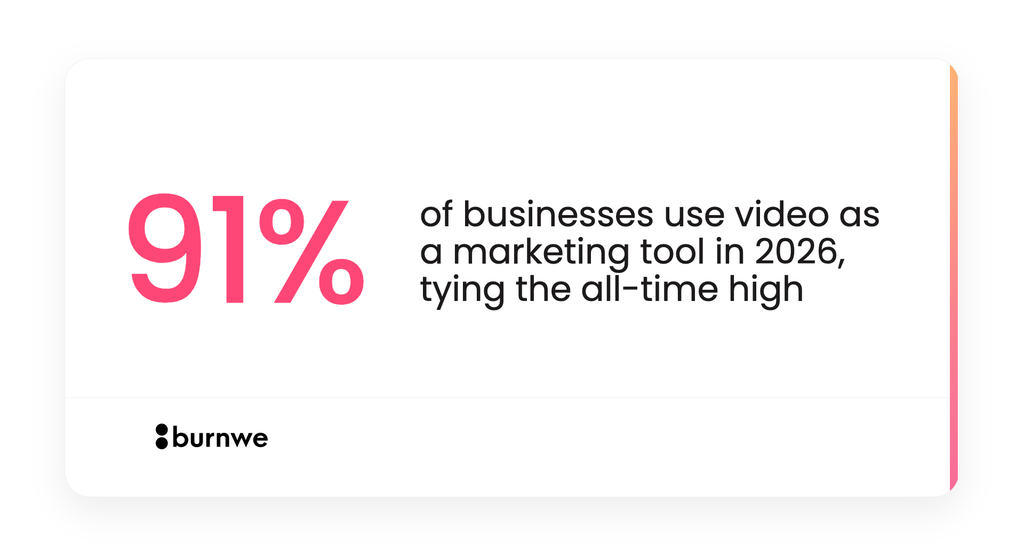
SaaS and AI companies need video marketing because buyers expect to see a product working before they talk to anyone. In 2027, 91% of businesses will use video as a marketing tool, and 93% of video marketers call it an important part of their strategy. Video is no longer an advantage. It is the baseline, and a company without it looks behind.
The case is stronger for software than for most products. A SaaS or AI product has no physical shape, so the buyer cannot picture it. A 60-second video shows the problem, the product screen and the outcome in one pass, which a feature page cannot do. For AI agents the gap is wider still, because buyers want proof that the agent does something useful before they trust it with real work.
Results back this up, with a caveat. 82% of video marketers report a good return on investment in 2026, down from 93% the year before. The drop does not mean video stopped working. It means more teams are publishing videos with no clear job, so the average result slipped. A video with one audience, one message and one next step still earns its cost.
The cost side is shifting too. 38% of marketers say video is getting more expensive and 30% say it is getting cheaper, which tells you the market is splitting in two. Cheap AI-assisted production is rising at one end, and premium custom work is holding its price at the other. That split is exactly why a hybrid approach, where Claude does the planning and professionals do the final production, is attracting attention. Read Burnwe’s cost breakdown of the SaaS videos in 2027 to lear more about video prices.
How do you build a video marketing strategy using Claude?
You build the strategy by giving Claude real source material and asking it to name one audience, one job and one next step for each video. Claude works best when it reads your actual words rather than generic prompts. Paste in your product brief, three or four sales call transcripts, your top support questions and the videos your competitors publish, then ask what buyers misunderstand most.
The answer usually exposes a pattern that a marketing team has stopped seeing. Buyers confuse your product with a neighbouring category, or they skip the one feature that wins deals, or they cannot tell what happens after sign-up. Each of those confusions is a video topic, and Claude can rank them by how often they appear in the material you supplied.
Once you have the topics, match each one to a stage of the buying journey. A top-of-funnel video explains the problem and the category, a middle-of-funnel video demonstrates the product, and a bottom-of-funnel video proves results through a customer story. The common SaaS and AI formats map onto those stages cleanly:
- Awareness: motion graphics or animated explainer videos, about 60 seconds.
- Consideration: product demo, how-to and AI agent demo videos, 60 to 90 seconds for the overview and longer for deep walkthroughs.
- Decision: testimonial and case study videos built around one measurable customer result.
- Launch moments: product launch and promo videos tied to a release date.
Then write a one-page video brief with Claude. A useful brief names the viewer, the single idea they must remember, the action you want, the placement (homepage, LinkedIn, email, sales deck) and the length. A prompt as simple as “Act as a B2B video strategist; from the attached transcripts, propose five video topics, the buyer objection each answers and the funnel stage” produces a draft you can edit in ten minutes.
Keep a human in the loop at this stage. Claude can sound confident about a buyer objection it has inferred from only a few calls, so check its list against your sales team before anything is scripted. A wrong topic costs far more than a wrong sentence, because it wastes the whole production budget.
How do you write a video script with Claude?
You write a video script with Claude by giving it the brief, a hard word count and a structure, then editing its draft for accuracy and voice. A spoken script runs at about 150 words per minute, so a 60-second video needs roughly 130 to 150 words. Claude can hit that count reliably when you state it, and it can trim an existing script without losing the core message.
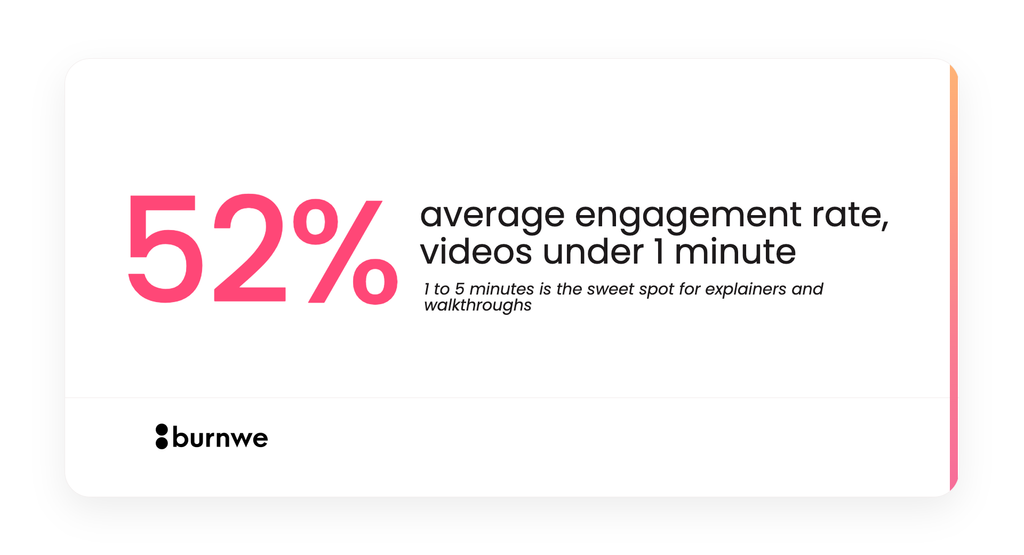
The length target matters because attention is the scarcest resource a video has. Short videos hold viewers best, and the 60 to 90 second range is the practical default for an explainer. Longer formats, such as a product walkthrough, can work when the viewer chose to watch, but they need chapters and a clear promise in the first ten seconds.
A reliable script structure for SaaS and AI products has five beats. Each beat answers one question the viewer is silently asking:
- Hook (0 to 5 seconds): what problem or result will this video address?
- Problem (5 to 15 seconds): why is the current way painful or slow?
- Solution (15 to 40 seconds): what does the product do, shown in action?
- Proof (40 to 52 seconds): what result or credibility backs the claim?
- Call to action (52 to 60 seconds): what is the one next step?
When you prompt Claude, supply the audience, the single message, the tone, the product facts it may use and the facts it must not invent. A prompt such as “Write a 140-word voiceover for a founder who is evaluating our analytics tool; use only the features listed below; open with the cost of manual reporting; end with a demo booking” gives far better results than “write a video script about our software.” Ask for two versions with different hooks so you have something to compare.
Then edit like a producer. Read the script aloud, remove any line a human would not say, and confirm every claim against your product. Claude will occasionally round a number up or describe a feature you do not have, and a video makes that mistake permanent and public.
To go deeper on structuring voiceovers, pacing hooks, and turning written concepts into spoken scripts, read our full guide on Blog Post and Video Text Writing.
How do you storyboard and plan scenes with Claude?
You storyboard with Claude by asking it to convert the approved script into a scene table, one row per shot, with duration, visual, on-screen text and sound for each. This turns a block of voiceover into a plan that an animator, an editor or a video generator can follow. It also exposes pacing problems before any money is spent, because a scene that needs eight seconds of explanation but only has three seconds of script is visible on paper.
A good scene table has a fixed set of columns so nothing is left to interpretation. Ask Claude to include the scene number, the time range, what the viewer sees, the exact voiceover line, the on-screen text, the transition and the audio cue. Add a column called “must show” for assets that cannot be invented, such as your verified logo, a real product screen or a customer photo.
The visual column is where product knowledge matters most. Claude does not know what your interface looks like unless you describe it or share screenshots, so give it the real screens and flow names. If you are still building the product, a design file works as the source of truth, and a stealth product can be storyboarded from mockups long before it is coded.
Ask Claude to challenge its own storyboard before you approve it. A prompt like “Review this scene table as a sceptical marketing director; flag any scene that shows features instead of outcomes” often removes two or three weak scenes. Cutting scenes early is the cheapest edit in the whole process, because later changes mean re-rendering or re-animating.
Keep a version log from the first draft. Name each brief, script and storyboard with a date or version number, and note why a decision was made. When a stakeholder asks in week four why a scene was cut, the log answers in one line instead of a meeting.
How do you use Claude for SaaS product demo and AI agent demo videos?
You use Claude for demo videos by having it turn a real user task into a short narrated walkthrough, with the outcome stated before the clicks. A product demo shows how the software works, and an AI agent demo shows an agent completing a job. Both fail when they list features, and both succeed when they follow one realistic task from start to finish.
Start by giving Claude the task and the result. For example, “a support lead asks the agent to triage 200 tickets, and it sorts them in 40 seconds” is a story. “The agent has triage, summarisation and routing” is a feature list. Claude can write the narration around the story, and it can suggest which two or three screens carry the most weight, so the video does not wander through every menu.
AI agents need extra care because buyers are sceptical. They want to see the input, the agent’s reasoning or steps, and the final output, ideally without cuts that hide failures. Ask Claude to draft a version that shows one realistic edge case, such as an ambiguous request the agent handles correctly, because that moment builds more trust than a flawless run.
Captions and on-screen text deserve attention too, since many viewers watch with the sound off. Claude can write short captions that match the narration, plus a version of the script rewritten for silent viewing. It can also draft the chapter titles and the description for the page where the demo sits.
For the recording itself, screen capture tools or Remotion-based animation can work for a rough internal demo. For a public launch or homepage hero, polished motion graphics that highlight the right interface elements are worth the budget, because the demo is often the first thing a buyer sees.
Discover more AI Agent Demo Video Examples in our Portfolio.
Explore how we visualize the invisible
How do you repurpose and distribute one video across channels?
You repurpose a video by cutting one hero asset into a set of shorter pieces, each written for the channel where it will run. Claude is useful here because the work is mostly text: choosing which 15 to 30 second moments to extract, writing a different opening line for each platform and drafting the posts that carry them. One 60-second explainer can become a homepage hero, three LinkedIn clips, an email header video, a sales deck slide and a YouTube upload.
Start with the channels where your buyers already pay attention. For B2B SaaS and AI, that is usually the homepage and product pages, LinkedIn, YouTube, email sequences and the sales team’s own outreach. Ask Claude to propose a distribution plan from your buyer profile and to write platform-specific titles, descriptions and first-line captions.
Placement changes the script. A homepage hero can run 60 to 90 seconds because the visitor is already curious. A LinkedIn clip needs a hook in the first two seconds and captions that carry the message without sound. An email video needs a thumbnail and a subject line that promises one specific thing.
Claude can also generate the testing plan. Give it your winning script and ask for four variations with different hooks, then run them as small paid or organic tests and keep the winner. The result is a steady loop in which one good video creates a dozen data points instead of a single launch moment.
Finally, plan the video’s home. Embed it near the top of the page it supports, add a transcript for search engines and AI assistants, and write a descriptive title and caption. Text on the page is what lets search engines and AI answers understand and quote a video, so skipping it wastes most of the discoverability.
At Burnwe, we build repurposing and customization directly into the production process so your video continues working long after launch day.
Rather than delivering a single file and calling it done, we strategically adapt and cut assets for every stage of your funnel, and handle full localization with access to over 1,200+ professional voice-over artists, ensuring your core message resonates across new markets and channels without losing its original polish.
Which tools turn Claude’s output into a finished video?
Five routes can turn Claude’s script and storyboard into a finished video, and the right one depends on how much brand control and polish the video needs. The table compares them on the criteria that decide most SaaS and AI projects. Claude is the planning layer in every row.
| Route | What it produces | Best for | Main limit |
|---|---|---|---|
| Claude Code with Remotion | Code-rendered animated text, charts and product screens | Technical teams, simple explainers, data videos | Needs a developer; limited illustration and character work |
| Avatar and text-to-video tools (for example HeyGen) | Presenter-style videos from a script | Training, announcements, localized versions | Looks generic; weak for custom brand storytelling |
| Script-to-video tools (for example Pictory) | Stock-footage videos from a script or article | Blog-to-video and social summaries | Visuals are chosen for you, so brand fit varies |
| AI video generators (for example Runway or Kling) | Short cinematic clips from scene prompts | Concept clips, mood scenes, B2C-style ads | Inconsistent across scenes; poor at exact product screens |
| Professional studio or agency | Custom motion graphics, 2D, 3D or live action with human creative direction | Homepage heroes, launches, AI agent demos, brand-critical videos | Higher budget and a longer timeline |
The fastest way to choose is to ask three questions. How long will this video stay live, how much does it need to look like your brand and how accurate must the product shots be? A video that lives for a week on social media can use a generator, while a video that anchors your homepage for a year should not.
Many teams end up using two routes together. They run internal and social content through a script-to-video tool, and they send the three or four brand-critical videos a year to a studio with the Claude-written brief in hand. That brief shortens the studio’s discovery phase, which is one of the quieter ways AI saves money without lowering the quality of the final result.
How do you measure video marketing results?
You measure video marketing with Claude by tying each video to one business action and tracking the viewing numbers that predict it. Views alone say little, because a video can collect thousands of plays and never move a buyer. Decide before launch whether the video exists to earn demo requests, shorten sales calls, lift trial sign-ups or improve a landing page’s conversion rate.
Track a small set of metrics in two groups. Viewing metrics show whether the video itself works: play rate (how many page visitors press play), average watch time, completion rate and the point where viewers drop off. Business metrics show whether it matters: click-through to the next step, demo or trial requests from pages with the video, and the share of closed deals where the buyer watched it.
The drop-off point is the most useful single number. If viewers leave at second 18, the problem is almost always the opening or the pacing around that moment, and a script edit fixes it faster than a new video. Ask Claude to read an exported retention table and propose three hypotheses for the drop, then test the most likely one.
Compare the same page before and after the video, and keep other changes to a minimum so the result means something. Teams that launch a video, a new headline and a pricing change in the same week cannot say which one worked. A clean test of four weeks is slower, but it gives a number you can defend to a CFO.
Be honest about attribution. Video often helps earlier in the journey than the click that gets the credit, so ask sales to record whether prospects mention a video. That one question in a CRM field turns scattered stories into a trend you can act on.
For a step-by-step framework on connecting video engagement directly to CRM pipeline and calculating defensible returns, read Burnwe’s complete guide on How to Measure Video Marketing ROI for B2B SaaS.
When should you hire a video agency instead of doing it yourself?
Hire a video agency when the video must look like your brand, show your product accurately and stay live for a year or more. Claude can cut planning time sharply, but it cannot replace an animator, a motion designer and most importantly a creative director. The honest split is that AI is strong at the front of the process and a human team is strong at the finish.
A freelancer can cost less per minute, and AI tools cost less still, but a homepage video that earns demo requests for twelve months spreads its cost thinly. A weak video at a low price costs more once you count the lost conversions and the second production run.
Several signals show it is time to bring in professionals:
- The video will be your homepage, launch or investor-facing hero.
- Generated clips keep drifting in colour, character or product detail between scenes.
- You need accurate motion graphics for a real interface, an AI agent or a technical architecture.
- The team has no one who can direct, edit and sound-mix to a consistent standard.
- A stealth product has no working build yet, so there is nothing to record.
- You are producing several videos a quarter and need consistency across all of them.
Turn your complex agent into a clear demo video now.
Explore how we visualize the invisible
The best way to combine the two is to bring Claude’s work to the agency. A clear brief, a tested script and a draft storyboard let a studio skip the discovery phase and spend its hours on craft. Ask any agency how they use AI in production, and favour the ones who say it speeds the work while a human leads the creative direction and the final quality.
How does a video marketing agency like Burnwe work with AI?
Burnwe is a video marketing agency for AI, SaaS and tech companies, founded in 2018, and it uses AI to speed up production while people lead the creative direction and the final quality. The team has worked with 450+ clients and made 1,200+ videos across 52 countries.
Burnwe’s clients come from AI products and AI agents, SaaS and apps, cybersecurity, productivity software, telecom, hardware and fintech. The video types include motion graphics explainers, animated explainers, product launch, product demo, promo, how-to, testimonial and case study videos. The styles are motion graphics, 2D animation, live action and 3D, so the style follows the product and the audience instead of the other way round.
A typical project runs 4 to 6 weeks from script to delivery, and Burnwe recommends about 60 seconds of video, up to 90. Revisions are unlimited at every stage. Pricing works per project, with multi-video discounts, or through video Creative as a Service (CaaS), a monthly or annual subscription for teams that need videos on a steady schedule.
One process detail matters for early-stage companies. Burnwe can build videos from Figma designs before a product is coded, which lets a stealth or pre-launch company show its product in a launch video without waiting for a working build. That is something a screen recording or a generated clip cannot do, because there is nothing real to capture yet.
If you need help shaping your video strategy and want a custom asset that clearly explains complex tech, builds instant buyer trust, and drives measurable pipeline, connect with professional agencies like Burnwe.
At Burnwe, we combine human-led creative direction and conversion-focused storytelling with tailored production for AI, SaaS, and tech companies, turning technical products into high-performing videos built to convert across your entire funnel.
FAQ’s
Can Claude create a video from text?
Not by itself. Claude turns text into a video plan with a script, scenes and one generation prompt per shot, and a video generator, a code library such as Remotion or a production team creates the footage. Connectors can pass Claude’s output to tools like HeyGen or Pictory so the render happens in one workflow.
Can Claude write a good video marketing script?
Yes, when you give it a clear brief, a word count and verified product facts. It writes strong first drafts and variations quickly, but a person should check every claim and read the script aloud before it goes into production.
How long should a SaaS marketing video be?
About 60 seconds, and up to 90, is the practical range for an explainer or product overview. Deeper walkthroughs and webinars can run several minutes when the viewer chose to watch. Put the main point in the first ten seconds either way.
How much does a SaaS explainer video cost?
A professional 60-second explainer from a specialist studio typically costs $5,000 to $15,000, while freelancers and AI tools cost less and premium animation costs more. Price depends mainly on style, length, voiceover and revision rounds. Ask every provider for a fixed quote on the same scope.
How long does professional video production take?
At Burnwe, a typical project takes 4 to 6 weeks from script to delivery. A written brief and a draft script from Claude can shorten the early weeks, because the studio starts from a clear direction instead of a blank page.
Want to partner with Burnwe for your neext video?
Explore how we visualize the invisible
Sources
- Wyzowl, State of Video Marketing 2026
- PostEverywhere, Video Marketing Statistics
- ScreenApp, Can Claude Create Videos
- Pexo, Automating Marketing Video Production with Claude Code
- Zero Future Tech, Generate Videos with Claude Code
- HeyGen, Generate AI Videos with Claude
- DEV Community, Build Perfect AI Videos Using Claude
- Crepal, Claude Video Creation: How to Plan Better Videos
- Burnwe