
A visitor lands on your product page. You have about ten seconds before they decide whether to stay or bounce to a competitor with a clearer pitch. Text can’t win that fight fast enough. A product video can.
That’s the entire reason product video production has quietly become one of the highest-leverage line items in a tech company’s marketing budget, not a “nice to have” reserved for big-budget consumer brands.
At Burnwe, and we’ve spent the last several years sitting across the table with SaaS founders, AI teams, and fintech leaders who all ask a version of the same question: “How do you showcase a product so its value clicks right away?”
This guide is the long answer. Grab a coffee.
Contents
- What Is a Product Video, Really?
- Why Product Video Especially Matters for Tech Companies
- Anatomy of a Product Video That Actually Converts
- See It In Action: Real Product Video Case Studies
- Can AI Actually Make Your Product Video?
- How We Build a Product Video, Step by Step
- What You Actually Get When You Partner With Burnwe
- Let’s Wrap it Up
- FAQs
What Is a Product Video, Really?
A product video is any video built to show a specific product’s value, features, or use case, with the goal of moving a viewer closer to a purchase, sign-up, or demo request. It’s a broad category, and that’s exactly the point.
Depending on your funnel stage, “product video” can mean:
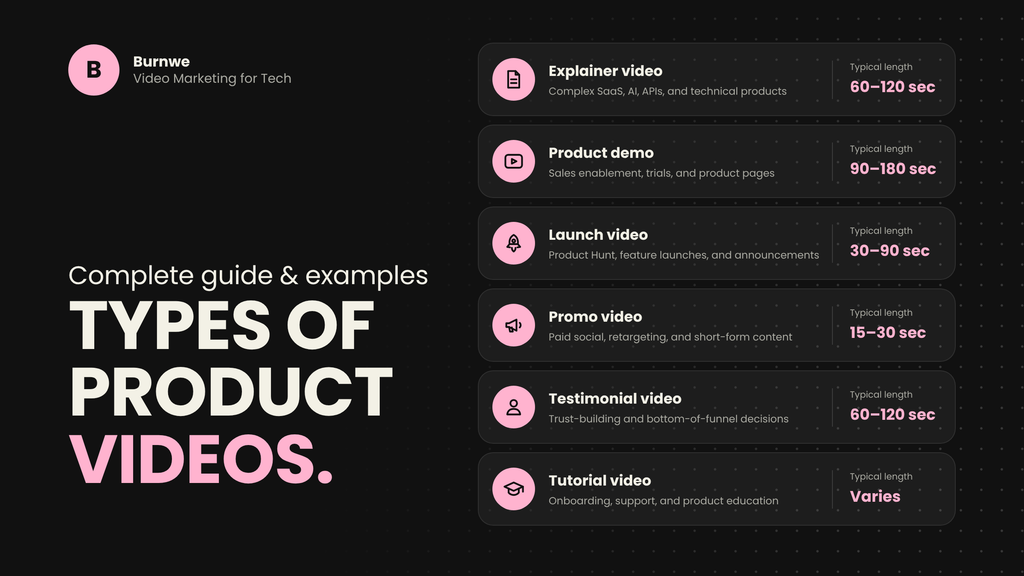
The common thread: every version exists to answer one visitor’s question faster than a paragraph of copy ever could, “What does this actually do for me?”
Why Product Video Especially Matters for Tech Companies
A recent Video Marketing research found that the overwhelming majority of consumers say they’ve been persuaded to buy a product after watching a video about it, and that most people now say they’d choose a short video over a blog post or infographic to learn about a product for the first time.
Tech products often have a communication problem, not a product problem.
The product may be powerful, but its value can be difficult to explain through a headline, feature list, or static screenshot. Buyers may need to understand several things at once:
- What problem does the product solve?
- Who is it built for?
- How does it fit into an existing workflow?
- What makes it different from other tools?
- What happens after someone starts using it?
Video gives you a way to connect those answers into one clear story.
It can also play a role at different stages of the customer journey.
- An explainer can introduce the product on a landing page. If your product is genuinely hard to explain, start with our SaaS explainer video guide.
- A demo can help a sales team explain the workflow.
- A launch video can create attention around a new release. Launching soon? Read what makes a Product Hunt launch video actually get upvoted.
- A tutorial can reduce confusion after signup.
Video can also support search visibility when it is implemented properly. Google recommends making videos discoverable through accessible pages, descriptive metadata, high-quality thumbnails, and relevant structured data. It does not guarantee that every video will appear in search, but it gives search engines clearer information about the content.
The important part is not simply adding a video to a page.
It is making sure the video has a clear job to do.
Anatomy of a Product Video That Actually Converts
Every high-performing product video we’ve made at Burnwe, regardless of industry, follows roughly the same narrative skeleton:
- The Hook (0-5 sec) – Name the exact pain your buyer already feels. No logo animation, no slow build. If you don’t earn the next five seconds, nothing else in the video matters.
- The Problem (5-15 sec) – Make the cost of the status quo visible. This is where most in-house scripts rush, and it’s the single biggest reason a video feels generic instead of specific.
- The Solution (15-40 sec) – Introduce the product as the natural answer, not a list of features. Show, don’t tell. The question is not “What can the product do?” It is “What becomes easier, faster, safer, or possible because the product exists?”
- The Proof (40-50 sec) – Proof can take different forms: a product interface, a specific workflow, a measurable result, a customer example, a clear technical differentiator, or a visual demonstration of the product in action. Complex products need clear, concrete explanations to make sense.
- The CTA (50-60 sec) – One action. Not three. Choose the action that matches the video’s purpose: Start a free trial, Book a demo, Explore the platform, Watch the full demo, Visit the product page, or Try a feature. The CTA should feel like the natural next step, not an unrelated sales message.
This structure is also why templated, AI-generated scripts tend to fall flat, more on that in a minute.
Once a video is live, it also needs somewhere to go; if you’re planning to run it as a paid ad, our promo video guide for 2026 covers how we cut these specifically for paid social.
See It In Action: Real Product Video Case Studies
One of the easiest ways to understand product video production is to see how it works for different types of products.
Coldtea: Explaining an Agentic IDE
Coldtea needed to introduce an agentic IDE built around coding agents and visual QA agents. The product was technically sophisticated, and its value depended on explaining how the different parts worked together.
Burnwe created a motion graphics product launch video designed to introduce the platform and communicate its value clearly within a short runtime.
The focus was not on presenting a long list of technical features. It was on making the product’s workflow understandable: coding agents build, visual QA agents identify regressions, and the two work together to support a more efficient development process.
The result was a launch-ready video built for a product that needed to communicate both technical depth and immediate value.
Opti: Making a Complex IAM Product Understandable
Opti operates in a much more technical category: identity and access management.
Its audience may be dealing with thousands of systems, tens of thousands of users, changing roles, former employees, and permissions that are difficult to track.
The video starts with those concrete situations rather than opening with a generic statement about cybersecurity.
It then explains how Opti connects to an organization’s identity provider, HRIS, and applications to create a continuously updated view of access. From there, it shows that Opti is not only about identifying risk. It also helps teams act by revoking entitlements, provisioning the right access, automating access reviews, and generating audit-ready reports.
The narrative turns a complicated enterprise problem into a clear sequence:
Understand who has access. Identify what needs attention. Take action. Reduce the administrative burden.
Bardeen.ai: Turning Automation into Something Tangible
Bardeen.ai helps users automate repetitive tasks and connect web applications.
The challenge was familiar: people spend their days jumping between tabs, copying information, and acting as the middleman between apps that do not communicate with each other.
The video begins with that frustration before introducing Bardeen as the solution. It then moves from the general promise of automation to specific examples, including saving people to a CRM, sending reminders, taking automatic meeting notes, and using ready-made templates.
That progression matters. Instead of explaining automation as an abstract concept, the video shows what automation looks like in everyday work.
It also makes the product feel accessible by highlighting that users can create custom automations without code.
Looking for professional and creative product video services? Talk to us.
Can AI Actually Make Your Product Video?
A few months ago, our co-founder Anush Mnatsakanyan posted about this on LinkedIn, and it still sums up how we think about this better than anything we could write here.