What are the best cybersecurity explainer video examples?
The best cybersecurity explainer videos turn one invisible threat into one clear picture and one reason to trust the vendor. This guide breaks down 12 Burnwe explainer videos for Fibocom, SARD, HERA, Onyxia, Scylla.ai, Mutable, Quma, MOXFIVE, Protelion, iDenfy, KIBOSH and EasyDMARC, and explains what makes each one work.
Burnwe made all 12 videos below. We chose them because they cover the main security explainer problems: invisible threats, acronym-heavy products, regulated buyers and skeptical technical audiences. This is a showcase of our own work, not an independent ranking, and several clients sit next to cybersecurity (IoT, AI and developer tools) rather than inside it.
Why do cybersecurity companies need explainer videos?
Cybersecurity companies need explainer videos because their product is invisible, hard to imagine the functionalities in real life, explain with plain text and their buyers want to understand it before they talk to anyone. A prevented attack leaves nothing to show, a protocol has no interface, and a policy setting looks like a line of text. Video is one of the few formats that can draw a threat, a flow of data and a protected outcome in under a minute, so a buyer leaves the page knowing what the product does and why it is credible.
The buying process now favors that kind of self-serve explanation, which raises the stakes for the first video a prospect sees.
What makes a cybersecurity explainer video work?
A cybersecurity explainer video works when it shows one problem, one mechanism and one outcome, in understandable words and clean visuals. Security buyers distrust hype, so the strongest videos avoid fear imagery such as hooded hackers and glowing padlocks. They replace it with a calm, precise picture of what happens to the data, the user or the network, which signals that the vendor understands the problem and has nothing to hide.
Length follows the same discipline. Burnwe recommends about 60 seconds, with 90 seconds as the upper limit, and 71% of marketers say videos of 30 seconds to 2 minutes work best. Detailed configuration and architecture belong in a longer demo, which you can plan with our guide to SaaS explainer video planning.
See SaaS and AI videos we have made for companies like yours. Watch the Burnwe portfolio →
Which 12 cybersecurity explainer video examples are worth studying?
The 12 examples below are motion graphics and animated explainer videos Burnwe produced for cybersecurity and security-adjacent tech companies. Each entry states what the company sells, what made it hard to explain, and what makes the video a useful model. Company facts come from public company pages. Burnwe’s own take on each video is labeled as such.
1. iDenfy: making a compliance step visible
iDenfy, founded in 2017, provides identity verification for businesses and serves more than 1,000 companies, covering KYC, AML and KYB checks. The hard part to explain is that verification happens in seconds inside another company’s app, so buyers cannot see what they would be buying.
What makes it work: Burnwe’s clear animation turns an invisible check into a visible path from a new user to a verified account. A compliance lead and a product manager can both follow it in one watch, which is the job of a good explainer video.
2. EasyDMARC: turning acronyms into a picture
EasyDMARC sells a platform that protects email domains from spoofing and improves email deliverability. DMARC, SPF and DKIM are three acronyms that most buyers cannot explain, even when they know their domain is a target.
What makes it work: Burnwe used motion graphic to replaces the tech term with a simple story of a sender, a receiver and a fake sender being blocked. The buyer does not need to learn the protocol to understand the result, and that lowers the effort of evaluating the product.
3. Protelion: building trust for complicated encryption
Protelion is a cybersecurity company headquartered in Berlin, with research and development in Yerevan, Armenia. It builds VPN and secure communication products on a proprietary protocol, for governments, critical infrastructure and private companies. These are cautious buyers, and encryption is the hardest kind of product to prove on screen.
What makes it work: The video made by Burnwe helps the company to earns trust through restraint. It explains a complicated protected channel with precise, uncluttered motion graphics, so the company looks careful and competent before a buyer reads a single data-sheet.
For Protelion Burnwe has also created an Arabic version of the video trough localization, to help the company enter new markets and scale the business.
Burnwe offers video localization in any language, helping companies connect with audiences beyond their primary business regions. We adapt video content for different markets by translating and localizing scripts, voiceovers, on-screen text, and other visual elements to ensure the message feels natural and relevant to each audience.
Beyond language, we also offer video customization to align videos with different market requirements, brand guidelines, and audience preferences. This includes adapting visuals, graphics, product interfaces, messaging, and formats to reflect local expectations or specific campaign goals.
Whether a company is entering a new market, targeting international customers, or repurposing existing content for different regions, Burnwe makes sure every version feels tailored to its intended audience while maintaining consistent brand identity.
4. MOXFIVE: clarity for buyers in a crisis
MOXFIVE, founded in 2019, is a cybersecurity incident response company that runs a platform showing milestones, costs and progress during a breach, and in January 2026 it launched an agentic forensics platform. Its buyers often watch the video under stress, days after an attack or while preparing for one.
What makes it work: A short animated walkthrough by Burnwe replaces a long service description with a clear sequence of what happens first, next and last. In a crisis, an ordered picture reassures more than a list of capabilities.
5. Scylla.ai: proving AI detection without hype
Scylla, founded in 2018 and based in Austin, Texas, builds AI video analytics that detect threats such as weapons and intrusions and run on edge or on-premises hardware. AI security claims invite doubt, because buyers have heard bold accuracy promises before.
What makes it work: Burnwe created a testimonial video for Scylla.ai, highlighting the real experience of working with its technology. For cybersecurity companies, testimonials are particularly valuable because trust, reliability, and credibility play a major role in purchasing decisions. Hearing directly from a satisfied customer helps validate the technology and gives potential buyers greater confidence in the solution.
In cybersecurity, where products protect sensitive systems and critical infrastructure, customer testimonials provide social proof that goes beyond marketing claims. They help communicate real-world value, build trust, and support purchasing decisions.
6. Mutable: explaining an invisible tool
Mutable, founded in 2016 and based in Denver, Colorado, develops a Microservice Platform-as-a-Service (PaaS) solution that helps developers overcome DevOps challenges and enables software companies to optimize their hosting infrastructure. Its Mutable Cloud connects existing infrastructure, including 5G networks, public cloud platforms, and edge data centers, allowing applications to run closer to end users with lower latency.
What makes it work: A motion graphics explainer video by Burnwe helps simplify the relationship between distributed infrastructure, edge computing, and application performance, making the platform’s value easier to understand.
Turn your complex agent into a clear demo video today.
Explore how we visualize the invisible
7. Fibocom: making a hidden component understandable
Fibocom, founded in 1999 and listed on the Shenzhen exchange since 2017, makes wireless communication modules that connect IoT devices to 5G and 4G networks. It describes its mission as reliable, accessible, secure and intelligent IoT wireless solutions. Modules sit inside other companies’ products, so end customers never see them.
What makes it work: An animation by Burnwe makes a hidden component visible and shows where it fits in a connected device. That is the right approach for any security or infrastructure part that buyers cannot open and inspect.
8. Quma: one idea explained with clear animation
Qumasoft, based in Beilngries, Germany, develops quma.ai, an AI-powered platform that helps companies manage product cybersecurity and navigate complex regulatory requirements. The platform supports compliance with regulations such as the Cyber Resilience Act (CRA), UNECE R155, and the Machinery Regulation. By combining AI agents, automated assessments, and knowledge management, it helps engineering teams reduce manual work, simplify compliance processes, and prepare for audits more efficiently.
What makes it work: Product cybersecurity and regulatory compliance involve complex processes that can be difficult to explain through text alone. A motion graphics explainer video by Burnwe breaks down how Qumasoft brings assessments, documentation, and AI-powered assistance together, helping potential customers understand the platform’s value and how it simplifies their compliance workflows.
9. SARD: creating trust around a complicated product
SARD Anti-Cheat, based in Armenia, develops AI-powered, kernel-based security software for PC multiplayer games. Its technology detects and prevents cheating, helping game developers and publishers protect their communities, player experience, and revenue.
What makes it work (Burnwe’s take): The explainer video uses motion graphics to simplify how SARD’s AI and kernel-based detection work together to identify cheats and protect gameplay. By visualizing an otherwise invisible security process, it helps game developers understand the technology, its benefits, and how it contributes to a fair gaming environment.
10. HERA by Waterfall: a clear flow from problem to result
Waterfall Security Solutions, founded in 2007 and headquartered in Rosh HaAyin, Israel, specializes in industrial cybersecurity. Its hardware-enforced unidirectional technology protects critical infrastructure, including power plants, water utilities, oil and gas facilities, and manufacturing operations, while allowing secure data visibility and connectivity.
What makes it work: A motion graphics explainer video by Burnwe helps HERA to visualize how its one-way communication technology works, making an otherwise difficult-to-grasp security concept easier for potential customers to understand.
11. Onyxia: simple visuals for a technical audience
Onyxia Cyber, founded in 2022 and headquartered in New York, develops an AI-powered cyber governance platform for security teams. It unifies data from multiple security tools, helping organizations identify vulnerabilities, manage assets, assess risks, and strengthen their overall cyber resilience.
What makes it work: A motion graphics explainer video by Burnwe visualizes how scattered security data becomes actionable intelligence, helping CISOs and decision-makers understand how the platform simplifies cybersecurity management and supports better-informed decisions.
12. KIBOSH: a video that carries the whole message
Kibosh develops an internet security and parental control platform that protects families from harmful online content. Its real-time filtering technology blocks pornography, malware, and unsafe websites at the network level, providing protection across devices both at home and on the go. LinkedIn
What makes it work: Internet filtering and network-level protection can be difficult to explain to parents without technical backgrounds. A motion graphics explainer video by Burnwe helps demonstrate how Kibosh works behind the scenes, showing how it blocks harmful content before it reaches a screen and gives families a safer online experience.
What patterns do the 12 cybersecurity explainer videos share?
The 12 videos share four patterns: one message per video, a visible mechanism, a calm tone and a clear ending. Each one picks a single job for the product and builds every scene around it, which is why a viewer can repeat the idea after one watch. They also make the mechanism visible, whether that is a verification path, a blocked fake sender, an encrypted channel or a detection-to-alert chain, because security buyers trust what they can follow step by step.
Tone is the third pattern. Security is a category full of fear marketing, so a measured voice and clean motion graphics stand out and signal that the vendor is confident. The fourth pattern is the ending, where each video leaves the viewer with one next step, such as booking a demo, starting a trial or reading the documentation, rather than a list of options.
Discover more AI Agent Demo Video Examples in our Portfolio.
Explore how we visualize the invisible
Which animation style suits a cybersecurity explainer video?
Motion graphics and 2D animation suit most cybersecurity explainer videos, because threats, data flows and protocols have no natural camera shot. Motion graphics work best for abstract products such as encryption, email authentication or compliance checks, where icons, lines and simple shapes can show data moving between systems. 2D character animation works better when the story needs a person, such as an analyst under pressure or a customer completing an identity check.
3D suits hardware and infrastructure, for example a device, a sensor or a network component that buyers want to see from several angles. Live action is the right choice for proof, such as customer testimonials, founder messages and event footage. Burnwe produces all four styles, and many security teams combine an animated explainer with a live-action customer story. The top marketing video types guide compares the formats in more detail.
How do you write a script for a cybersecurity explainer video?
A cybersecurity explainer script follows five beats: the problem, the stake, the mechanism, the outcome and the next step. Start with a situation the buyer already recognizes, such as a spoofed email, a failed verification or a breach alert, and say in one sentence why it matters. Then explain how the product works in plain words, using one example instead of a feature list, and end with the measurable outcome and a single action.
Keep the script short enough for the length target. At about 150 spoken words per minute, a 60-second video holds roughly 150 words, so every sentence has to earn its place. Replace jargon with a one-line explanation, or cut it, and avoid claims you cannot support, since technical buyers check them. Review the script with your security lead before storyboarding, because a wrong technical detail is far cheaper to fix on paper than in animation. For a fuller walkthrough, read the guide to planning a SaaS explainer video.
What mistakes weaken a cybersecurity explainer video?
The most common mistakes are fear imagery, jargon overload, feature lists and vague promises. Fear imagery, such as hooded figures and red warning screens, makes a vendor look like every other vendor and can reduce trust with technical buyers. Jargon overload loses the non-specialist who often signs the budget, and feature lists leave the viewer with nothing to remember.
Vague promises such as “complete protection” invite doubt, so replace them with a specific outcome the product delivers. Another frequent mistake is making the video too long, which pushes the key message past the point where most viewers stop watching. A final mistake is hiding the video on a low-traffic page, so place it on the homepage and product pages where visitors already expect an explanation.
How do you make a cybersecurity explainer video easier to find in search and AI answers?
You make a cybersecurity explainer video easier to find by surrounding it with text, because search engines and AI answer tools read titles, descriptions and transcripts far more reliably than footage. Publish a corrected transcript beside the embedded video, write a title in the buyer’s own words, such as “how email authentication stops spoofing”, and add a two or three sentence summary above the player. Host the master video on YouTube, embed it on the relevant page and add video structured data so the page and the video describe the same thing.
Chapters and internal links help too. Question-led chapters give an answer engine a passage it can quote, and links from related articles show the video’s topic and importance. See our trends for 2026 for where search and video are heading.
Which metrics show a cybersecurity explainer video is working?
Measure the video against one goal, such as demo requests, trial sign-ups or time on the product page, rather than views alone. Compare conversion between visitors who watched and visitors who did not, over a fixed period, and connect your video player to your CRM so you can see which viewers become leads. Track completion and drop-off as well, because a consistent drop at one moment shows exactly where the video loses people.
Set the baseline before launch, so you can tell whether the video changed anything. For security products with long sales cycles, also watch assisted conversions and sales feedback, since a good explainer often shortens the first call by answering the basic questions early.
Measuring video performance goes beyond counting views and likes. The real value lies in understanding how videos contribute to business goals, from increasing brand awareness and engagement to generating qualified leads and supporting conversions. Tracking the right metrics helps companies evaluate their video marketing ROI, identify what works, and make smarter decisions about future content.
Which explainer approach fits your cybersecurity product?
Choose the approach by the main doubt your buyer has, not by the style you like best. The table maps product types from the examples above to the worry a video must answer and the approach that answers it.
| Product type | Buyer’s main doubt | Explainer approach |
|---|---|---|
| Identity and compliance | “Will this slow down my users?” | Show the verification path from sign-up to approval |
| Email and domain security | “I do not understand the protocol” | Replace acronyms with a sender, receiver and blocked fake |
| Network encryption | “Can I trust a proprietary method?” | Calm, precise visuals of the protected channel |
| Incident response | “What happens in the first hours?” | An ordered sequence from alert to recovery |
| AI threat detection | “Does the AI really work?” | One concrete chain from feed to alert |
| Developer and AI tools | “Is this worth my team’s time?” | Show the input becoming the useful output |
| Hardware and IoT components | “Where does this fit?” | Make the hidden part visible inside the device |
Where should you publish a cybersecurity explainer video?
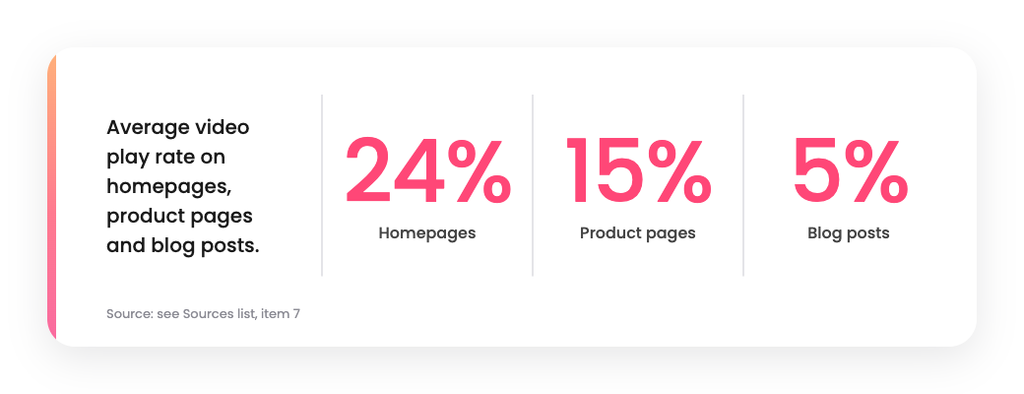
Publish the explainer on your homepage first, then on product pages, in sales emails and on YouTube. Homepage visitors are the most likely to press play, and a security buyer who has just landed wants the fastest honest summary of what you do. Place the video near the top with a one-line summary beside it, so a visitor who never presses play still learns what it shows.
Blog posts are the weakest home for a product video, so use them to link to the page that hosts it. Our guide to integrating video into your marketing strategy shows how to map each video to a buyer stage, and the guide to video marketing for tech companies covers distribution in more detail.
How is a cybersecurity explainer video made?
A cybersecurity explainer video is made in five stages: a questionnaire, a custom script, a storyboard, animation and delivery. Burnwe’s typical timeline is 4 to 6 weeks from script to delivery, with unlimited revisions at every stage. The script comes first, because changing the message after animation starts is the most expensive edit in the process.
Security products often have hard secrets to protect, so the team shares only what the script needs, and the storyboard lets the client check every claim before a frame is animated. If the product is not coded yet, Burnwe can build the video from Figma designs. AI speeds up parts of production, while creative direction and final quality stay human-led. For the cost side of the plan, read our SaaS explainer video cost breakdown.
How do you choose a video agency for a cybersecurity product?
Choose an agency that has explained technical products before and can show how its process protects your message. Ask each candidate the same questions and compare the answers side by side.
- Relevant work: two videos for security or infrastructure products, with the goal each served.
- Script ownership: who writes the script, and whether you approve it before visuals begin.
- Revisions: how many rounds you get, and at which stages.
- Timeline and price: a stated turnaround and a written scope.
- Format range: whether the team delivers vertical and short cutdowns for LinkedIn.
For a wider comparison, see the guide to video marketing vs video production for SaaS.
To see more explainer and demo work, browse the demo videos in the Burnwe portfolio.
Want to partner with Burnwe for your neext video?
Explore how we visualize the invisible
FAQ’s
What makes a good cybersecurity explainer video?
A good cybersecurity explainer video shows one threat, one mechanism and one outcome in plain language. It avoids fear imagery and focuses on how the product protects data, users or networks. Calm visuals and specific claims build more trust than dramatic ones.
How long should a cybersecurity explainer video be?
Most cybersecurity explainer videos should run about 60 seconds, with 90 seconds as the upper limit. Marketers report that 30 seconds to 2 minutes works best. Put deeper technical detail in a separate product demo.
Should a cybersecurity explainer video be animated or live action?
Animation suits most security products, because threats, protocols and data flows have no natural camera shot. Live action works better for customer stories and founder messages. Many teams use animation for the explainer and live action for proof.
How long does a cybersecurity explainer video take to make?
Burnwe’s typical timeline is 4 to 6 weeks from script to delivery. The schedule depends on script approval speed and the number of revision rounds. Locking the script before animation begins keeps the project on time.
Where do I find more explainer video examples for tech companies?
Start with the Burnwe portfolio, which groups explainers, demos, launch and promo videos by industry. You can also read our guide to the best video marketing examples of 2026 for campaign-level lessons.
Sources
- Gartner, Gartner Sales Survey Finds 67% of B2B Buyers Prefer a Rep-Free Experience (March 2026)
- Wyzowl, State of Video Marketing 2026 (as cited by ProfileTree, Video Marketing Statistics)
- Wistia, State of Video 2026 (as reported by PPC Land)
- Burnwe YouTube channel
- Burnwe Website