
Imagine a scenario: you’ve poured your heart into creating a high-quality video. It looks great, the message is clear, and you’re ready to share it with the world. But here is the million-dollar question: Can you just upload the same video to every platform and call it a day?
In 2026, the answer is short and simple – no.
Social media users have only seconds – sometimes milliseconds – to decide if your content is worth their time. Each platform is its own ecosystem with unique vibes, technical specs, and audience behaviors. If you want to boost brand recognition and maximize ROI, customization isn’t optional; it’s the standard.
During years of work in the industry, the Burnwe team has formed many principles related to the workstyle with clients, video production quality, and delivery. So customization of video content for social platforms is one of those principles. It’s an inseparable part of our video marketing strategy and process.
Here’s how to optimize your video content for the big four in 2026.
Facebook remains a powerhouse for community and long-form discovery. However, the way people consume video here is specific. Even if you have the most impressive video content, unfortunately, you’ll not be able to earn distribution and go viral if you disregard these important points needed for the customization of video content on Facebook.
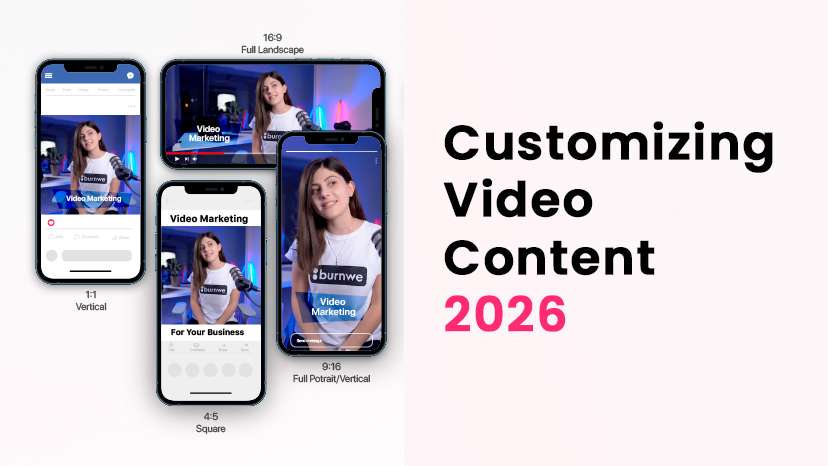
Most users are on mobile. A 1:1 (Square) or 4:5 (Vertical) ratio takes up more screen real estate, making it much harder to ignore than traditional widescreen. So pay attention to the aspect ratio of your video.
By default, Facebook videos start on mute, and users choose to turn the audio on. Most users continue to consume the muted videos because of the surroundings in which they are watching the video. So use dynamic on-screen text and bold imagery to tell the story without sound.
If your video has a voiceover or people talking, upload a custom SRT file. This ensures your message is accessible to everyone, everywhere, and the audience can resonate with it more in-depth.
Another important point for Facebook is the thumbnail. Don’t let the algorithm choose a random frame. Your thumbnail can appear before and/or after the video, so it’s important for it to be carefully chosen. Create a high-contrast thumbnail with a compelling headline to drive that initial click.
But don’t forget about the technical requirements of Facebook as well; they are equally important:
- Format: Facebook recommends uploading videos in .MP4 or .MOV format (with H.264 compression), square pixels, fixed frame rate, progressive scan, and stereo AAC audio compression at 128kbps+.
- Length: Can be up to 240 minutes long, up to 4GB large and can have a maximum frame rate of 30fps. Though 1-3 minutes is the sweet spot for engagement.
- Aspect Ratio: Can be 16:9 (horizontal) to 9:16 (full portrait)
Instagram is a visual-first platform, so visuals reign supreme and texts back up their positions. In 2026, the focus has shifted entirely toward immersive, full-screen experiences.
If on Facebook, the videos are automatically muted; On Instagram, they follow the phone settings. If the phone is muted, the videos are also muted, and believe us, most of the users have their phone on mute.
Reels & Stories are your bread and butter. While Reels are for discovery, Stories are for engagement. They remain the most popular format on Instagram. Use the 9:16 vertical format to ensure your video fills the entire phone screen.
Meanwhile, carousels keep growing in popularity and are the 2026 biggest growing trend on Instagram. Using this format and creating engaging and visually appealing carousels will boost your engagement.
Instagram loves a good loop. Reels don’t have a special pause button unless you intentionally press to pause it, so reels are autoplayed. Ensure the beginning and end of your video transition smoothly so viewers stay for a second (or third) watch.
Instagram’s algorithm favors clean, high-quality visuals, and users come here for visual inspiration. Keep your on-screen text minimal and trendy, but eye-catching.
All the other requirements for videos are mainly similar to Facebook’s.
The ideal Instagram video format is MP4. To ensure high viewership and engagement from your audience, your video should include the following technical requirements.
2026 Tech Specs for Instagram:
- Minimum resolution for landscape video is 600 x 315
- Minimum resolution for square video is 600 x 600
- Minimum resolution for vertical video is 600 x 750
- The current aspect ratio is 4:5, but keep an eye out as Instagram often updates it
- Max file size for all formats is 4GB
- Recommended video formats are .MP4 and .MOV
- Reel length up to 3 minutes
- Frame rate range: 23-60 FPS
- Maximum caption: 2,200 characters.
- Caption recommendation: 125 characters
LinkedIn isn’t just for resumes anymore; it’s a video-first platform for thought leaders and B2B brands, so customization is very important.
While the majority are desktop users, they love the 16:9 (horizontal) format. However, square videos are currently gaining more popularity because they work better for the growing number of mobile professional users.
Little hack: To stand out, try a square frame with a “headline” bar at the top and captions at the bottom. This “wrapper” style makes your video look like a premium piece of content and helps your content reach the audience faster.
Business professionals are busy; everyone is busy. Get straight to the value or use the “hook” to immediately stop the scroll and boost engagement.
And as LinkedIn has certain video requirements, here as well, you should consider them.
- Videos can be anywhere from 3 seconds to 15 minutes in length, with a maximum file size of 5GB
- LinkedIn allows you to upload both horizontal and vertical videos, but you can also crop those vertical videos into a square on the newsfeed.
- The platform supports a wide range of video file formats, including some of the most frequently used video file formats such as MP4, AVI, and QuickTime.
- The aspect ratio of LinkedIn native videos can either be 1:2.4 or 2.4:1, and their resolution can vary from 256X144 pixels to 4096X2304 pixels.
- The frame rate of LinkedIn videos can be between 10 and 60 frames per second, while their bit rates can range from 192 kbps to 30 Mbps.
X (ex-Twitter)
It’s probably the simplest way to paste a URL and share a native YouTube video on X. But a native X video is a good option and quite shareable on this social media platform. But remember that on X, speed and “humanity” are key. People want to see the faces behind the brand.
Videos featuring people in the first 3 seconds see a massive spike in emotional intensity and retention, therefore, interactions and engagement.
Twitter native videos again autoplay without sound unless viewers click on them. So you can use texts and subtitles.
2026 Tech Specs for X:
- Possible video size for Twitter reaches 512 MB only. If your recording is bigger, you can compress it.
- Resolution should be no lower than 32 x 32 pixels; its max is 1920 x 1200 pixels.
- Video duration shouldn’t exceed 140 seconds.
- If you provided your credit card to set up a Twitter Ad account, you can upload a video up to 10 minutes long.
- Twitter accepts only two extensions: MP4 and MOV.
- There are two possible video styles: Portrait and Landscape. Their recommended aspect ratios are between 1:2.39 and 2.39:1.
Pro Tip and a Little Secret: The “Pattern Interrupt” Strategy
Want to really stand out? Try a Pattern Interrupt. This involves creating videos that simulate the platform’s interface or use unexpected visual hooks that break the user’s habitual scrolling motion. By offering something that looks different from the “standard” post, you grab attention instantly. Experimenting with these visual ideas becomes easier with a Predis.ai video generator, which helps marketers turn creative concepts into engaging videos without building each one from scratch.
Want to see how this works in practice? Watch Burnwe’s video guide where we break down video customization and show exactly how to apply this approach effectively.
Final Thoughts
To “rock” your video marketing in 2026, you must stop thinking of video as a “one-size-fits-all” asset. Identifying which social media platforms work best for your marketing needs and understanding how to use your content right will enable you to shape a firm basis for your future success.
Customizing for different social media platforms is the secret to improving visibility, building customer loyalty, and ensuring your message actually gets heard.
Generally, you should always prepare three versions of every video: Horizontal (16:9), Square (1:1), and Vertical (9:16).
Are you ready to optimize your video strategy? Let’s get to work!